The Higgsfield alternative with 50+ AI models

The Higgsfield Alternative in 2026

Replace your AI stack with one platform. Create videos, images, music, and more using 50+ premium models — for less than most single-purpose tools.

2M+Active users
50+AI Model
4.9User rating
99.9%Uptime

Why One Creative Workspace changes everything

Other platforms forget you the moment you switch models. DaVinci doesn't.
50+ Models, One Subscription

Access video, image, upscale, and editing models — all from a single workspace. No juggling separate tools or subscriptions.

Cinematic Video Generation

Studio-quality motion, camera control, and consistency built in — no premium tier required.

Your Work Stays Yours

Full commercial rights on every generation. DaVinci never trains on your content — your prompts and outputs stay private by default.

Image to Video, Instantly

Turn any still into cinematic motion. No queue, no premium tier — just upload and generate.

AI Editing Suite

Enhance, upscale, restyle, and translate — a full creative toolkit in one place, not scattered across apps.

No Credit Anxiety

Predictable pricing that doesn't punish you for creating. Know exactly what each generation costs before you hit generate.

DaVinci vs Other AI Suites

See exactly what you get when you switch.

Features
With DaVinci
Other tools
AI Models Available
50+ models
Limited
Image Generator
20+ models
Limited
Video Generation Models
30+ models
Limited
Audio Generator
Yes
Limited
Music Generator
Yes
Limited
Enhance & Upscale
Yes
Costs extra
Video Templates
100+ templates
Limited
Trends
Yes
Editor Canvas
Yes
Switch Models Mid-Project
Yes
Commercial Rights Included
Always included
Limited
End-to-End Encryption
Yes
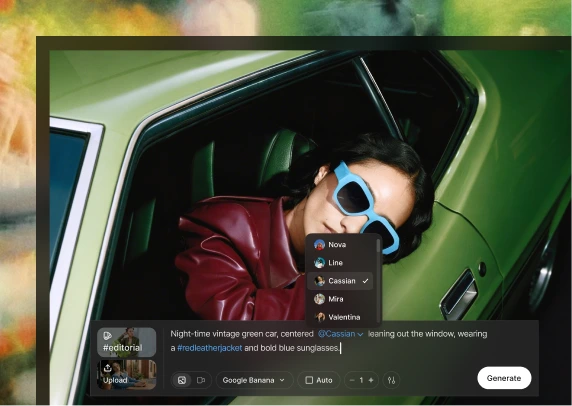
DaVinci prompt box showing model selection and prompt editing

Start fresh on DaVinci in minutes

No exports, no migration headaches. Just sign up and start creating — everything you need is already in one place.

No setup, no learning curve

Coming from Higgsfield? You'll feel at home instantly. DaVinci creates video, image, enhance, and editing into one canvas — so you can start your first project right away.

  1. 1. Sign up free — no credit card needed.
  2. 2. Pick a model or template to start.
  3. 3. Create, edit, and export — all in one workspace.

Everything's ready out of the box. No credits to figure out, no tools to stitch together — just open DaVinci and create.

What our customers say

Switched from another AI suite, now creating 3x faster

I was paying premium credits on another platform and still hitting limits mid-project. With DaVinci I get 50+ models, video, image, and enhance — all in one canvas, for less. I haven't looked back.

Maya RodriguezContent Creator

Frequently Asked Questions

Yes. Everything you create on DaVinci is private by default and only accessible to you. Your prompts, uploads, and generated outputs are stored securely and are not visible to other users. DaVinci does not use your inputs or outputs to train its AI models. We also require our third-party model providers to follow the same principle. Your content is processed only to provide the requested service and is not reused or shared for other purposes.

Credits are used only when you generate content with DaVinci’s AI tools. They are not required for downloading your own creations or exported assets. Each tool consumes a different number of credits per generation, depending on the model and the type of output. A single generation may produce one or multiple results. Credits reset based on your subscription cycle. Extra credits are available on all plans and are used after your regular credits are exhausted. An active subscription is required to use credits.

Yes. Content generated with DaVinci can be used for both personal and commercial purposes as long as you have an active subscription. You own the content you create and are free to use, modify, and monetize it. However, you are responsible for ensuring that your use of the content complies with applicable laws and does not infringe third-party rights, such as copyrights, trademarks, or personal identity rights.

No. Attribution is not required for AI-generated content created with DaVinci under Basic, Pro, or Creator plans. You can use your generated content freely without displaying the DaVinci name, logo, or link.

DaVinci provides access to AI tools and generated content under its Terms of Use. While we aim to offer reliable and high-quality outputs, users are responsible for how generated content is used in real-world contexts. Additional legal terms or protections may be available under separate enterprise agreements.

Ready to upgrade from Higgsfield?

Join 2 million+ creators who made the switch. Start with our free plan — no credit card needed.

Start Using DaVinci Free