Seedance 2.0 vs Seedance 2.5: What Changed

Seedance 2.5 is the newer of ByteDance's two current video models, and the change you'll notice first is length. It makes clips of up to 30 seconds in one generation, twice the 15-second limit of Seedance 2.0, and it accepts more reference files. Seedance 2.0 isn't obsolete, though: on DaVinci, it still renders up to 4K and costs fewer credits per second. So the Seedance 2.0 vs 2.5 choice usually comes down to the shot in front of you. Reach for 2.5 when you need a long single take or a scene built from many references, and stay with 2.0 for short clips, 4K delivery, and cheaper experiments. Both models are available through DaVinci, which publishes this article, so the settings and credit prices here come from its video composer.
Seedance 2.0 vs 2.5 at a Glance
The two models share the same workflow, so the real differences show up in length, resolution, references, and price. As of November 2026, DaVinci lists them like this:
What Is Seedance 2.0?
Seedance 2.0 is a video generation model from ByteDance's Seed team that creates picture and sound together. You can give it text, images, short video clips, and audio as input, and its official model page highlights control over performance, lighting, and camera movement. On DaVinci, it makes clips from 4 to 15 seconds long at resolutions up to 4K.
What Changed in Seedance 2.5
Longer Clips in One Pass
Length is the headline. Seedance 2.5 can generate a 30-second clip in a single run, and TechNode's launch report adds that it can extend a clip over several turns. On DaVinci, the duration setting now runs from 4 to 30 seconds.
That matters more than it sounds. A 25-second product walk-around or a full exchange between two characters can now be one continuous shot, with no join for viewers to spot.
More Reference Files
The same report says one request can carry up to 30 reference images, plus 10 videos and 10 audio files. In practice, that means you can pin down more of the scene at once: a character from several angles, the product they're holding, the location, a voice, and a motion reference. DaVinci's composer takes fewer images than the model's maximum, up to 16 for Seedance 2.5 against 9 for Seedance 2.0, and you point to each file in the prompt with a tag such as @Image, @Video, or @Audio.
What Stayed the Same
If you already know 2.0, there's little to relearn. Both models generate sound effects and music along with the picture, and on DaVinci, both handle text-to-video, image-to-video, video-to-video, and audio-to-video, with start and end images and the option to continue from a clip's last frame.
Where Seedance 2.0 Still Has the Edge
Newer doesn't mean better for every shot. Seedance 2.0 renders up to 4K on DaVinci, while 2.5 stops at 1080p, so anything headed for a large screen or a 4K deliverable still belongs on 2.0.
Price is the other gap. At 480p, Seedance 2.5 uses about 1.6 times as many credits per second as 2.0, and at 1080p, about 1.7 times. If your shot fits in 15 seconds, the extra length of 2.5 buys you nothing, and the lower price of 2.0 lets you try more versions of the same idea.
Same Prompt, Both Models: What We Saw
To see how the two interpret the same request, we ran one prompt on both models in DaVinci with identical settings: 5 seconds, 480p, 16:9, and sound on. The Seedance 2.0 clip cost 145 credits, and the Seedance 2.5 clip cost 225.
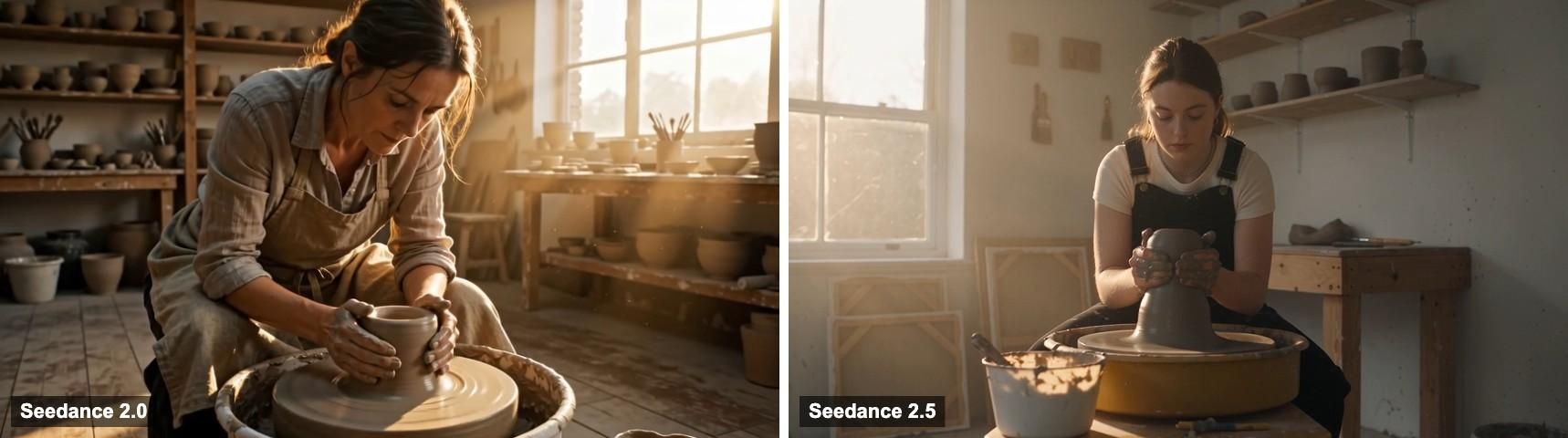
Both clips got the basics right: a potter at a wheel, window light, and a push-in toward her hands. Where they differed was taste. Seedance 2.0 went for warm, hazy backlight with dust in the air and pushed all the way in to a tight close-up of the hands. Seedance 2.5 picked cooler daylight and a centered, symmetrical frame, and its slower push-in stopped at chest height.
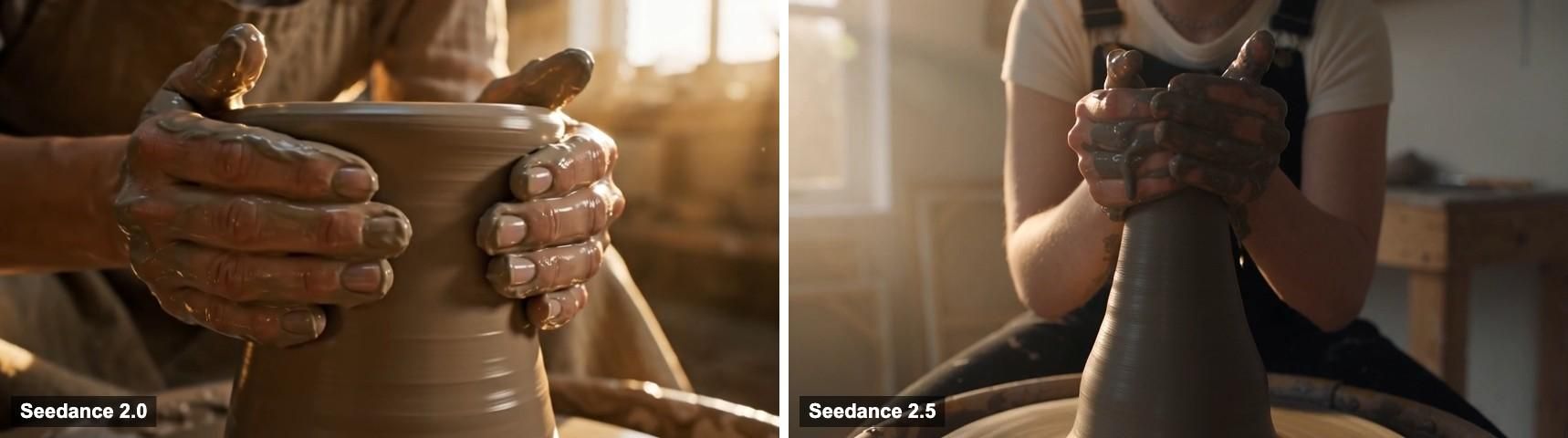
On detail, each model got one thing right and one thing less so. Seedance 2.5 kept the vase tall and narrow, as the prompt asked, while 2.0 shaped a wider, shorter form. In the last second of the 2.5 clip, though, the potter's hands clasp over the top of the clay, which looks less like real wheel throwing than the cupped hands in 2.0. The two potters also look like different people, because the prompt didn't include a reference image.
One run per model isn't a ranking, but it's a useful reminder that the newer model isn't automatically the better pick for a short shot. We reviewed the picture only, so listen to the sound of your own clips before you use them.
Which Should You Use?
Choose Seedance 2.5 when the shot runs longer than 15 seconds, when several characters or products have to stay consistent, or when the scene depends on lots of reference files. Choose Seedance 2.0 for clips of 15 seconds or less, for anything you must deliver in 4K, and for projects where you expect to go through many attempts.
You can also use both. Work out the prompt and the framing on 2.0 at 480p, where a 5-second try costs 145 credits, and move to 2.5 only once the scene needs its length or its references.
How to Use Seedance 2.0 and 2.5 on DaVinci
- Open the Video composer and pick Seedance 2.0 or Seedance 2.5 from the model list. The Seedance 2.0 page on DaVinci shows everything the model supports.
- Write the prompt around one shot: the subject, the action, the camera move, the light, and the sound you want. Give the shot a single camera instruction, because conflicting moves, like a locked camera and an orbit, confuse the model.
- Add a Start Image, an End Image, or references if you need a specific character, product, or place, and tag each one in the prompt.
- In Video settings, set the aspect ratio, duration, and resolution, and check the credit cost the composer shows before you generate.
- Watch the result for the subject's identity, the framing, any on-screen text, visual glitches, and audio timing before you export it.
For Seedance 2.5 on DaVinci, the steps are the same, with three differences: the duration goes up to 30 seconds, resolution tops out at 1080p, and you can add up to 16 reference images instead of 9.
Is Seedance 2.0 or 2.5 Free?
No, neither is free on DaVinci. Every generation uses credits, and the composer shows the cost before you start. A 5-second clip at 480p costs 145 credits on Seedance 2.0 and 225 on Seedance 2.5, and the price goes up with length and resolution. Other apps that offer the models set their own prices and terms, so check each one before you plan a project around it.
Planning a Long Scene with Either Model
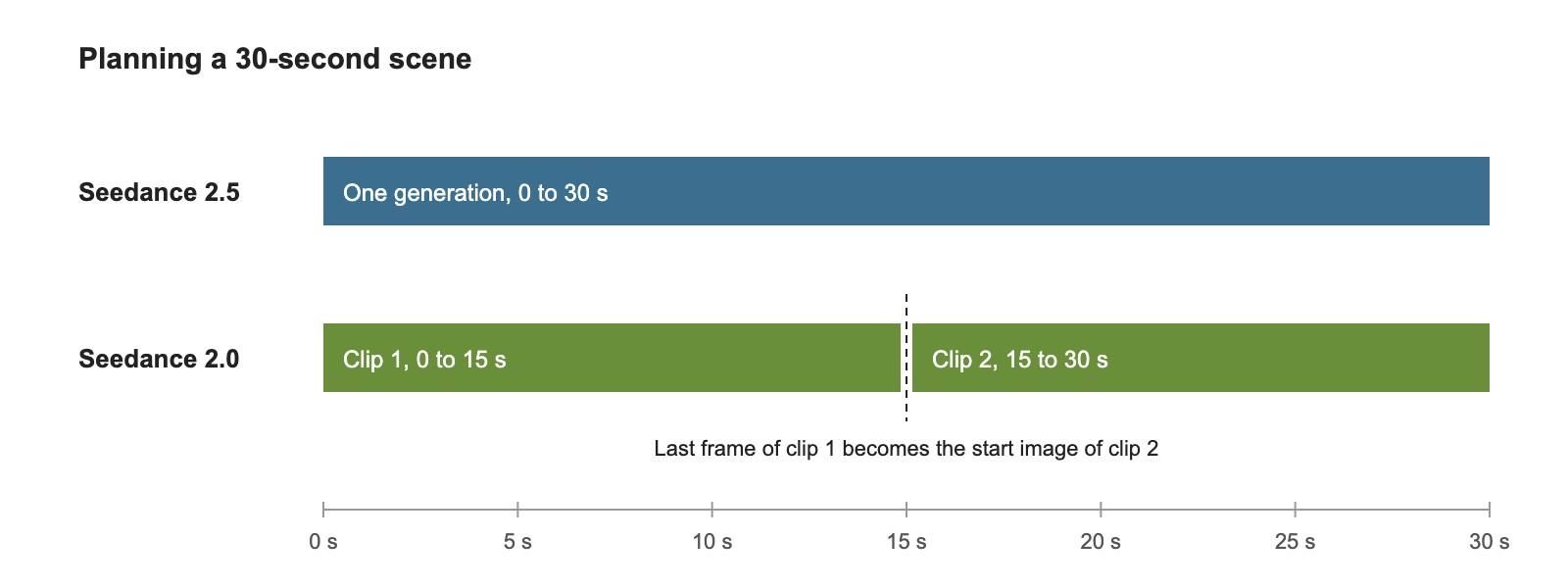
For a 30-second scene, Seedance 2.5 can do it in one pass, which avoids a visible join and keeps the light and the characters continuous. With Seedance 2.0, you split the scene into two shots of up to 15 seconds each and use the last frame of the first clip as the start image of the second. Put the cut at a natural break, such as a change of angle or a pause in the action, so the join reads as an edit rather than a glitch. Either way, a reference image of the main character helps them look the same from the first second to the last.
Drafted with AI assistance and reviewed by Yasin Karatekin. Last updated: November 4, 2026.